
Reference-to-Video: Building a Brief With the Rule of 12
How Seedance 2.0 weighs image, video, and audio references when you stack up to 12 inputs. A working pattern for brand ads with product shots, a mood clip, and a music bed.
You can hand Seedance 2.0 up to twelve reference items across images, video clips, and audio beds. The model weighs them differently depending on how many you send. Here is a pattern for composing a brief that lands on the first or second take.
Why twelve
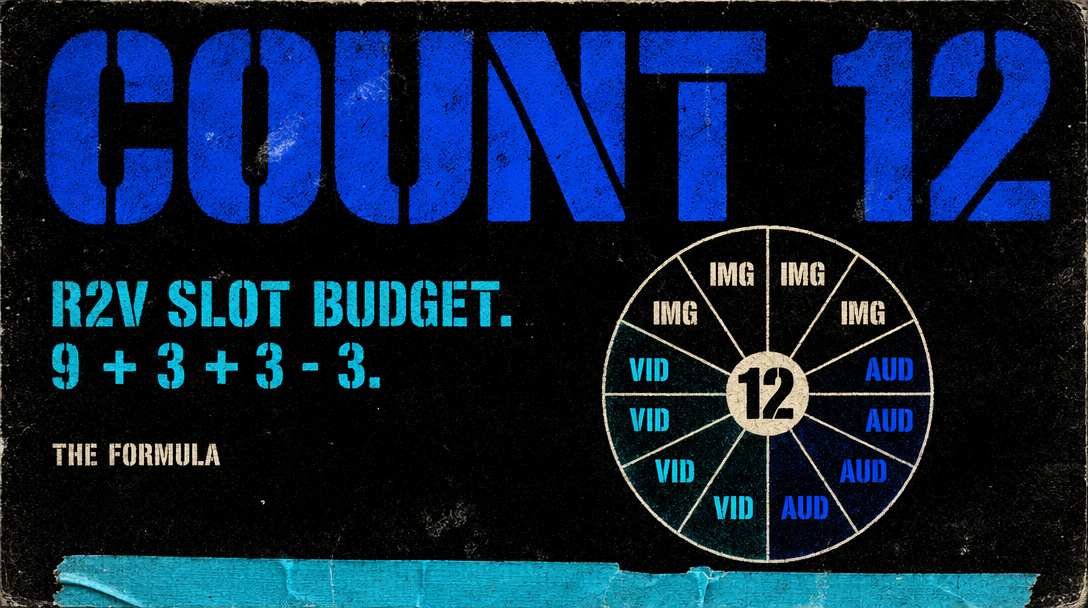
Twelve is the upper bound on total references per call at the bytedance/seedance-2.0/reference-to-video endpoint. You can split that pool any way you like: nine images and three videos, six and six, eleven and one. Each modality trades off against the others because the model conditions on all of them when it picks motion, palette, and pacing.
The default that works for most ad briefs: six image references, three video references, three audio references. That lands at twelve. For tighter identity, push to nine images and drop audio to one. For tighter pacing, go six images and five videos.
How the model weighs each modality
Image refs set identity and frame composition. A product shot at 2048 by 2048 is a grounding anchor: the thing has to show up looking like that. Palette and lighting come from images too. More image refs mean a stronger identity constraint.
Video refs set motion and pacing. A three second mood clip of someone walking through a city at dusk tells the model what cadence to shoot at. Without a video ref, Seedance picks a default tempo that is usually slower than you want for a social ad.
Audio refs set rhythm and optional lip sync. For non-dialogue ads, audio controls cut pacing: beats in the bed line up with camera pushes or hard cuts.
A brand ad, end to end
You are shooting a 12 second ad for a matte black wireless earbud. Your stack: seven images (four product, shelf, lifestyle, palette swatch), two videos (warehouse mood, prior ad pacing), three audio (full bed, pulse stem, voiceover). Total: twelve.
1import { fal } from "@fal-ai/client";23fal.config({ credentials: process.env.FAL_KEY });45const result = await fal.subscribe(6 "bytedance/seedance-2.0/reference-to-video",7 {8 input: {9 prompt: "Matte black wireless earbuds, warehouse with warm practicals, mid tempo push-in on the product, final 2 seconds on packaging.",10 image_refs: [11 "https://assets.brand.com/earbud-front.png",12 "https://assets.brand.com/earbud-side.png",13 "https://assets.brand.com/earbud-back.png",14 "https://assets.brand.com/earbud-angle.png",15 "https://assets.brand.com/earbud-shelf.png",16 "https://assets.brand.com/earbud-lifestyle.png",17 "https://assets.brand.com/palette.png"18 ],19 video_refs: [20 "https://assets.brand.com/warehouse-mood.mp4",21 "https://assets.brand.com/prior-ad.mp4"22 ],23 audio_refs: [24 "https://assets.brand.com/music-bed.wav",25 "https://assets.brand.com/pulse.wav",26 "https://assets.brand.com/vo.wav"27 ],28 duration: 12,29 resolution: "720p",30 aspect_ratio: "9:16"31 }32 }33);3435console.log(result.data.video.url);
The four product shots repeat an identity, so the model weights them heavily. The warehouse clip tells it how to move. The pulse stem tells it where to cut.
When to drop references
More is not always better. If your image refs disagree on palette, the model averages them and you get a muddy look. Three tightly matched product shots outperform seven inconsistent ones.
Quick test: if you would not put two refs side by side on a mood board, do not put them in the same call.
Common mistakes
Sending a logo file and expecting it to appear in frame. Logo files work as palette cues, not asset injection. Treat image refs as mood and identity.
Sending a three minute audio file. The model biases toward whatever hits in the first fifteen seconds. Cut audio refs to the section you want the shot to sync against.
Mixing aspect ratios in video refs. Seedance reads motion regardless of ratio, but a 16:9 and a 9:16 ref can give conflicting hints. Match ratios to your output when you can.
What to verify in the output
Check identity first: does the product look right. Check palette: is the look consistent. Check pacing: does the camera move at the tempo your video ref implied. If any are off, swap one reference at a time. References do more work than prompt text at this stage.